

Select Page
Home 5 Product News 5 How to Get More Product Reviews on Your Amazon Listings

Blog

Originally published on September 17, 2018

How to Get More Product Reviews on Your Amazon Listings

Guest post by Chris Dunne from FeedbackExpress There are two types of reviews (feedback) on Amazon: Product reviews – These can be found on the product listings page. They should be solely focused on the product itself. Seller feedback – These can be found on the seller’s profile. This is where the buyer rates your […]

Guest post by Chris Dunne from FeedbackExpress

There are two types of reviews (feedback) on Amazon:

  1. Product reviews – These can be found on the product listings page. They should be solely focused on the product itself.
  2. Seller feedback – These can be found on the seller’s profile. This is where the buyer rates your seller performance (shipping, response time etc.).

According to a study by BrightLocal in 2016, 79% of us trust online reviews as much as personal recommendations and 91% of consumers read online reviews for local businesses.

Imagine, you’re shopping for a new slow cooker on Amazon and you see two products priced similarly.

Product A has 50 product reviews whilst Product B has 500 product reviews. Both products are rated 4.2 out of 5 stars.
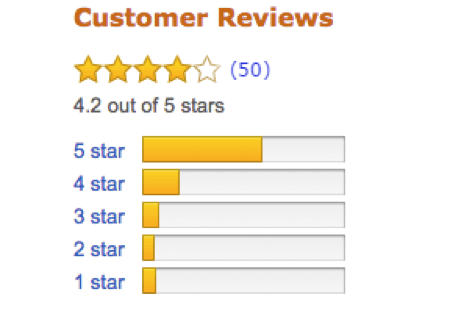
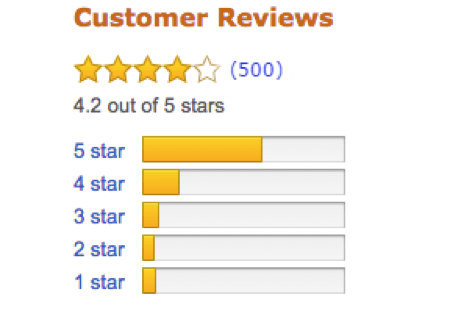
How to Get More Product Reviews on Your Amazon Listings

Product A                                                                                                                                    Product B

Which are you most likely to purchase?

Answer: Product B.

This is why product reviews are so vital for private label sellers. They are a silent force that help drive sales and increase conversion rates.

Positive product reviews provide social proof and build consumer trust — potential buyers can see you’re selling a quality product which people are happy with.

They’ll also help improve your product visibility, making it easier for buyers to find your products. To learn more about how to rank your products higher on Amazon, check out this article.

How to generate more product reviews

Firstly, (as I’m sure many of you are aware) it’s against Amazon’s terms of service to offer incentives for product reviews.

Don’t do it, it’s not worth it. If you get caught (and you will eventually), you’ll lose your selling privileges.

In Amazon’s words, “You may not intentionally manipulate your products’ rankings, including by offering an excessive number of free or discounted products, in exchange for a review.”

Amazon encourages you to request reviews but any attempt to manipulate reviews is prohibited. This includes asking for a positive review or providing incentives for reviews.

Getting product reviews on Amazon can take a long time. For every 100 orders, a typical response rate is 1 or 2 product reviews.
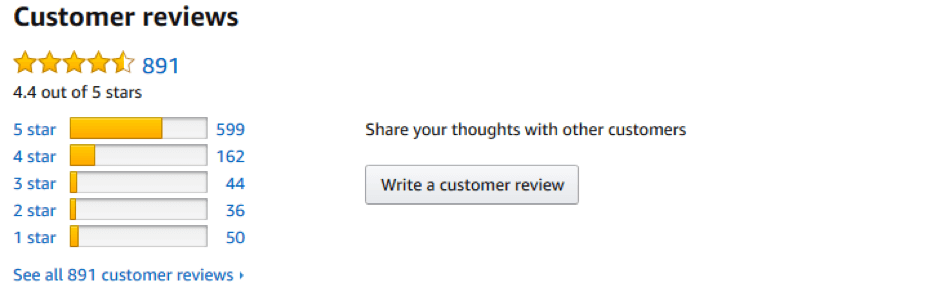
Product Reviews on Your Amazon Listings


However, by using the professional templates available by most automated feedback solutions, sellers are typically seeing a much higher level of engagement and ultimately, more product reviews…Yay!

Here’s our four-step process for getting more product reviews on Amazon:

    1. Sell a high-quality product.
    1. Have an outstanding product detail page that clearly details what the product is.
    1. Provide a great customer experience.
  1. Use reputable automated product review software such as FeedbackExpress to increase engagement levels.

If you’ve achieved the first three steps, then all you need to do is ask for a review, in the right way, at the right time and make the review process simple.

When to ask for product reviews?

With reviews, timing is everything! With most automated product software, you can decide when you want to ask for a review.

This includes: sending your review request X days after the item has been delivered or when a buyer has left seller feedback. Those buyers who do leave positive seller feedback are more likely to take the time to leave a product review as well— so, ensure you follow-up with these customers.

A popular strategy among users is to send a number of emails at different points that add value and build rapport with customers. You should make your emails as personal as you can.

For example, here’s a two-step process which can be easily automated within our software.

Email 1: Customer service – Product has been shipped.

“Thank you for your order, I just wanted to let you know your item has been shipped.

Here are some top tips on how to use your new product.”

This a good time to introduce your brand (always include your logo) and offer tips on using your product, if relevant.

It’s also an opportunity to prevent negative feedback — by including your customer service details so buyers can get in touch if they have any issues with their order, instead of getting frustrated and posting a negative review. This demonstrates that customer satisfaction is important to you.

The added benefit of sending a customer service email first, besides improving brand awareness and reducing negative feedback, is that it increases your product review count.

When you ask for a review at a later date, buyers already know about you, they remember that you offered them tips on how to use the product and they’re more receptive to posting a product review because of that.

Email 2: Product review request – One week after delivery.
“Have you had a chance to try out [product name]? If so, what do you think? Let me know if there’s anything I can help you with.”

Inform sellers that you’re a small business that values customer satisfaction and feedback highly. If the buyer asks a question, answer it as soon as you can — even after the purchase.

The timing of when to ask for a product review (after an order has been delivered) will largely depend on the product. This could range from a day or two for a phone charger to a few weeks for a health and beauty product that needs tested first. But, don’t ask for a review before you know the product has been delivered safely.

Also, don’t be shy about sending follow-up emails but don’t bombard them. People are busy and for whatever reason, don’t open all their emails. A valuable feature in most automated feedback solution is the ability to resend a product review request if the buyer didn’t open the first email, typically 3-4 days after the initial one. This is one feature that helps to increase your product review count without question.

How to ask for a product review

When you send an email, you should customize your content and add value.

Here are seven tips to help you create a great product review request process.

    1. Personalise your emails and include a logo.
    1. Add value by giving tips on how to use the product.
    1. Always be polite and professional.
    1. Ask open-ended questions such as “how did you find?”.
    1. Don’t offer incentives!
    1. Include a link to the product review page to make it easier for buyers to comment directly. Don’t include links to external sites!
  1. Remind buyers that you’re happy to address any concerns they may have.

How to deal with negative product reviews

Negative product reviews are the Achilles heel of every private label seller.

Amazon will not remove a product review unless it is against their guidelines. For example, if the product review is seller feedback and contains nothing about the product itself. Amazon will also consider removing a review that contains unsuitable content, abhorrent speech, violent content or promotes illegitimate conduct.

If you find a comment which you think may warrant removal, click on the “Report abuse” link then enter the reason why you find the content inappropriate. You can also contact Seller Support for any reviews which infringe on Amazon’s guidelines.

If your request is successful, you’ll receive a message from Amazon like the below.
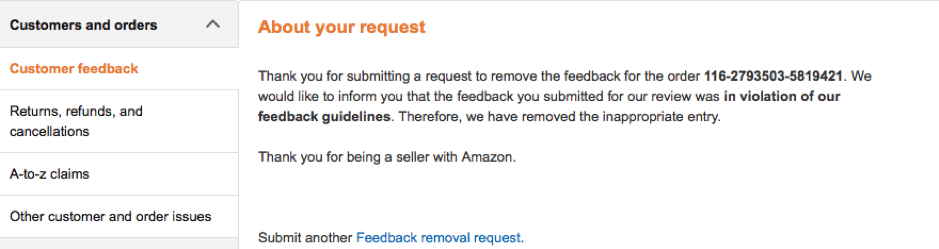
If you receive a valid product review, respond to the customer as soon as you can and try to find out what happened. Show the customer you value customer service.

Amazon doesn’t edit reviews but buyers can change their product review at any time they decide. However, sellers are not allowed to pressure buyers into removing reviews.

If there was a genuine issue with the product then you may want to consider sending a replacement or offering a partial or full refund. Alternatively, you could offer a coupon for a future purchase.

If there was a misunderstanding about the product, this is a good opportunity for you to give your side of the story. When communicating with the customer, empathise and show that you are interested in helping to resolve their issue.

In some cases, you might want to respond publicly to the comment to demonstrate that you value customer service and product quality. However, when you’re responding, try not to come across as defensive.

When you communicate with customers (whether manually or using automated software) you should abide by Amazon’s guidelines. The two main mistakes sellers make are offering incentives and including links in their messaging. The only link you are permitted to include is a link for a customer to leave a review for a purchase.

Can bad reviews be good for your business?

Well, in a way they can as long as the majority of reviews remain positive. For example, a bad review could help you improve your product or your listings. If you receive a number of bad product reviews highlighting the same issue, then you should take action to eradicate that issue with your product, making it better for future buyers.

Also, a study undertaken by Reevoo revealed 95% of customers suspect fake or censored reviews when bad scores aren’t present. So, a bad review could actually be beneficial by making your business appear more credible.

How to avoid negative product reviews on Amazon

Despite the positives that negative feedback can bring it’s advisable to prevent it happening if you can.

So, here are six quick tips to help you avoid negative product reviews.

    1. Provide accurate and detailed product descriptions.
    1. Include images of the product from different angles.
    1. Consider using images with a 360-degree view or video for higher value items.
    1. Evaluate the reasons for why negative product reviews are left.
    1. Check the product matches the order before you ship.
  1. Try to give some context for the size of the product—many negative product reviews relate to the product being much smaller than anticipated.

Conclusion

For any seller who creates their own listings, whether it’s a one-off product, a bundle, or a private label product line, having a way to increase product reviews without breaking Amazon’s terms of service is critical to their business.  Product review software makes the process of gathering reviews so much easier through automation and is fully compliant with Amazon’s terms of service. 

Product review software like FeedbackExpress makes the process of gathering reviews so much easier through automation and is fully compliant with Amazon’s terms of service . You can customize templates written by professional copywriters proven to increase customer engagement.
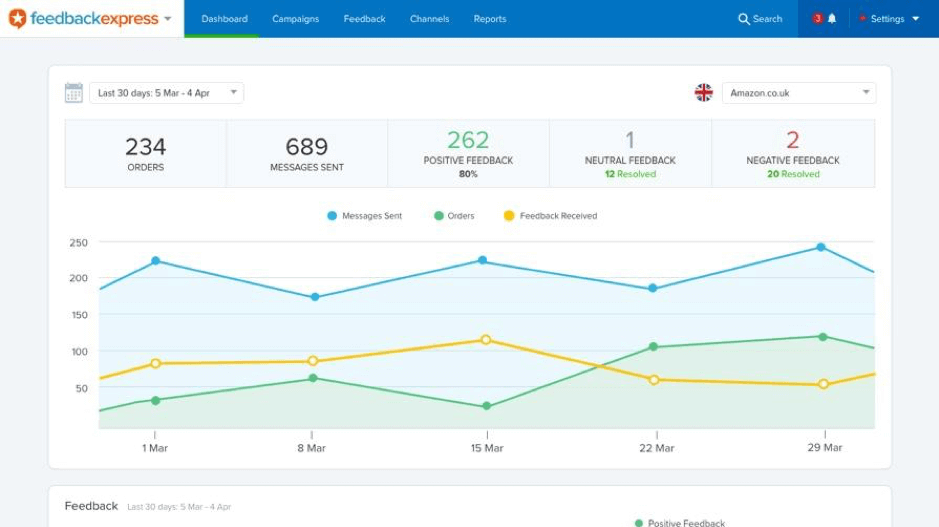
An automated feedback solution is a great way to generate more product reviews and prevent negative feedback.

“The core of maturity, that I see, is starting with a unified view of inventory. I’ve got to be able to accurately represent what do I have, make sure that I know where it’s located so I can get it to my customers quickly.”

— Troy Graham, Descartes

What is the first thing I should fix if I want to scale operations?

Start with a unified view of inventory. The core of maturity starts with being able to accurately represent what you do have and make sure that you know where it’s located to get it to customers quickly. Without a unified view across your warehouses, 3PLs, and vendors, you cannot make the best decisions because you don’t have the best information at hand.

With Inventory Visibility, Businesses Can Make Smarter Allocation Decisions

Once inventory is centralized, businesses can move from reactive updates to intentional allocation. They can decide how much inventory to expose to each channel, when to use buffers, which marketplaces need extra protection, and how seasonality or campaign performance influence availability.

Once I know what inventory I have, how should I decide where to make it available?

Inventory allocation should reflect where orders are coming from, where marketing is working, and which channels carry the most risk. Once you know what you have and where it is located, you can think more strategically using centralized inventory to make prioritization happen automatically. One fertilizer company lost a little over 5,000 orders in one weekend because someone manually uploaded the wrong available inventory to Amazon.

Better Inventory Data Improves Planning, Purchasing, and Growth Bets

Better visibility turns inventory data into a planning tool. With insight into sales velocity, inventory levels, vendors, and channel performance, businesses can make more informed replenishment decisions, avoid overbuying, and test new product lines or vendor-supplied inventory without taking on unnecessary risk.

“You have to have unified inventory to know how to price your products just at that basic level. I can’t price my products if I don’t know the true cost to get it.”

— Mike Bernico, Flxpoint

How does better inventory data help me make smarter buying decisions?

It lets you measure whether your plan is working before you commit more capital. A key question becomes: “Did my plan work? Am I overleveraged in one place or another?” Centralized systems can also help businesses test new product lines or vendor relationships by looking at sales velocity by channel, allowing them to take risks in a calculated and measured way.

Intelligent Order Routing Turns Inventory Complexity Into Automation

Once inventory and supplier data are reliable, businesses can automate fulfillment decisions. Orders can be routed based on cost, speed, margin, location, warehouse priority, vendor fallback, split-shipment rules, or customer expectations. This helps hybrid fulfillment scale because every order does not need a manual review.

How do I decide the best way to fulfill each order?

There is no single answer, which is why order routing needs to account for the context of each order. Intelligent order routing is not just sending an order to someone who has stock; it is taking each and every order and treating it like its own unique use case. Depending on the order, the business may prioritize speed, margin, an internal warehouse, vendor fallback, or preventing split shipments.

Supplier Inventory Sync Extends Inventory Beyond the Four Walls

For hybrid fulfillment to work, supplier inventory needs to become part of the operating model. Supplier sync does not always require advanced technology; it can happen through automated files, FTP, email, APIs, EDI, or ecommerce storefront integrations. The key is replacing manual updates with automated, reliable supplier data.

Can supplier inventory really be treated like part of my own inventory?

Yes, but the goal is not necessarily to force every supplier into a complex integration. Real-time supplier sync can be defined as any way to get an automated update from a supplier, such as Google Sheets, email, FTP, API, EDI, or ecommerce storefront connections. The key is that accurate supplier stock is foundational. If you don’t have an accurate view of what is in stock with your suppliers, you cannot tell your sales channel accurately what’s available.

Exception-Based Workflows Keep Humans Focused Where They Matter

Automation does not remove people from the process. Mature operations let technology handle the routine majority while humans focus on exceptions, such as high-value orders, fraud risk, compliance requirements, restricted products, export rules, or unusual fulfillment scenarios.

If my business has special cases, can automation still work?

Yes. The point is not to automate every possible decision; it is to automate the routine work and surface the exceptions. Businesses should not have to look at every single order. Instead, technology can highlight high-value orders, risky locations, or compliance requirements. The goal is to take care of the 80% of workflows that are obvious while still allowing human review when specific exceptions arise.

The Right Inventory Technology Should Fit the Business, Not Overwhelm It

Software decisions should be based on business fit, not popularity, feature volume, or broad “all-in-one” promises. Growing ecommerce businesses should identify their highest-impact bottleneck, prioritize what matters now, and choose technology that is right-sized but flexible enough to support future phases of growth.

How should I choose software without overbuying or picking the wrong system?

Start with your priorities, not the biggest feature list. Avoid an all-in-one system that claims to “do everything under the sun” and look for a “best of breed approach” with systems that can scale as you add channels or vendors. The practical advice is to stack rank what matters now, make sure the system can support future phases, and choose technology that fits your business rather than overwhelming it.

How to Scale Ecommerce Operations Beyond Spreadsheets

For many growing ecommerce businesses, Finale and Flxpoint work together as a practical answer to these challenges. Finale helps centralize and manage internal inventory, purchasing, warehouse operations, and stock visibility, while Flxpoint helps connect vendor inventory, automate supplier sync, and route orders across hybrid fulfillment networks. Together, they give businesses a best-of-breed way to improve inventory accuracy, reduce spreadsheet work, and scale fulfillment without forcing every process into a one-size-fits-all system.

Ecommerce Fulfillment Operations FAQ

What Is Ecommerce Fulfillment Operations?

Ecommerce fulfillment operations are the processes that move an online order from purchase to delivery. This includes managing inventory, syncing product availability across channels, routing orders to the right warehouse, 3PL, supplier, or vendor, and making sure the customer receives the right product on time. As discussed in the webinar, fulfillment is no longer limited to “what’s in my warehouse these days”; growing businesses may rely on internal warehouses, 3PLs, marketplace fulfillment services, and supplier inventory at the same time.

What Are Ecommerce Fulfillment Operation Examples?

Examples of ecommerce fulfillment operations include updating inventory across Shopify, Amazon, Walmart, and other sales channels; allocating inventory to specific marketplaces; sending orders to an internal warehouse, 3PL, or vendor; syncing supplier inventory through files, APIs, EDI, email, or FTP; replenishing warehouse stock based on sales velocity; and flagging exceptions such as high-value orders, compliance requirements, or restricted products. In the webinar, the speakers also discussed hybrid fulfillment examples where a business may fulfill some products from its own warehouse and use vendors as a fallback or extension of available inventory.

How Can I Track My Inventory at an Ecommerce Fulfillment Center?

The best way to track inventory at an ecommerce fulfillment center is to create a unified inventory view that shows what is available, where it is located, and how that inventory connects to each sales channel. That means tracking inventory across internal warehouses, fulfillment centers, 3PLs, marketplace fulfillment programs, and supplier locations instead of relying on disconnected spreadsheets. The webinar emphasized that businesses need to “accurately represent” what they have and know where it is located so they can get products to customers quickly.

How Can I Connect My Inventory to My Supplier?

You can connect supplier inventory through several methods, depending on what the supplier supports. The webinar discussed low-tech and advanced options, including automated Excel or CSV files, Google Sheets, email updates, FTP servers, APIs, EDI, and direct connections to ecommerce storefronts such as Shopify, BigCommerce, or Magento. The key is to ask suppliers how they share inventory today, then use a system that can automate that data flow instead of manually copying supplier inventory into spreadsheets.

What Is Ecommerce Order Routing?

Ecommerce order routing is the process of deciding where an order is fulfilled from after a customer buys. In a simple operation, every order may go to one warehouse. In a more complex or hybrid fulfillment model, the best fulfillment source may depend on inventory availability, shipping speed, cost, margin, customer location, warehouse priority, vendor fallback rules, or whether the order should be split. The webinar described intelligent order routing as treating each order like its own use case, so businesses can automate the best fulfillment decision without manually reviewing every order.

Keep Up With the Latest From Finale

All the inventory tips, trends, best practices, news, and insights you need, delivered straight to your inbox.

Subscribe to Our Newsletter