

Prime Day is often dubbed “Christmas in July” for a reason: it offers a significant sales boost during the summer months when retail activity typically slows down. Prime Day 2025 is expected to surpass last year’s $14.2 billion, up 11% from 2023. Last year, we saw an interesting trend: the growth of mobile shopping. Mobile devices drove nearly half (49.2%) of online purchases versus desktop shopping. This is a huge jump of 18.6% YoY.
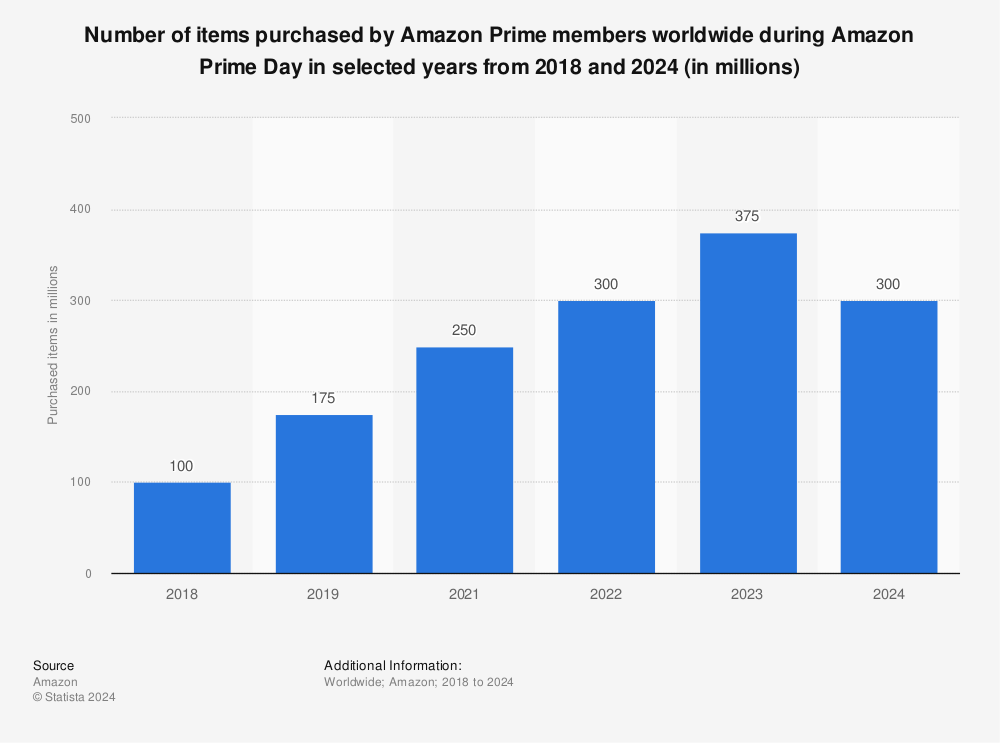
Compared to pre-pandemic times, the number of items purchased by Amazon Prime members worldwide during Amazon Prime Day has almost doubled. In 2021, Amazon Prime users bought 250 million items, up from 175 million articles in 2019. In 2024, the figure grew further to approximately 300 million.
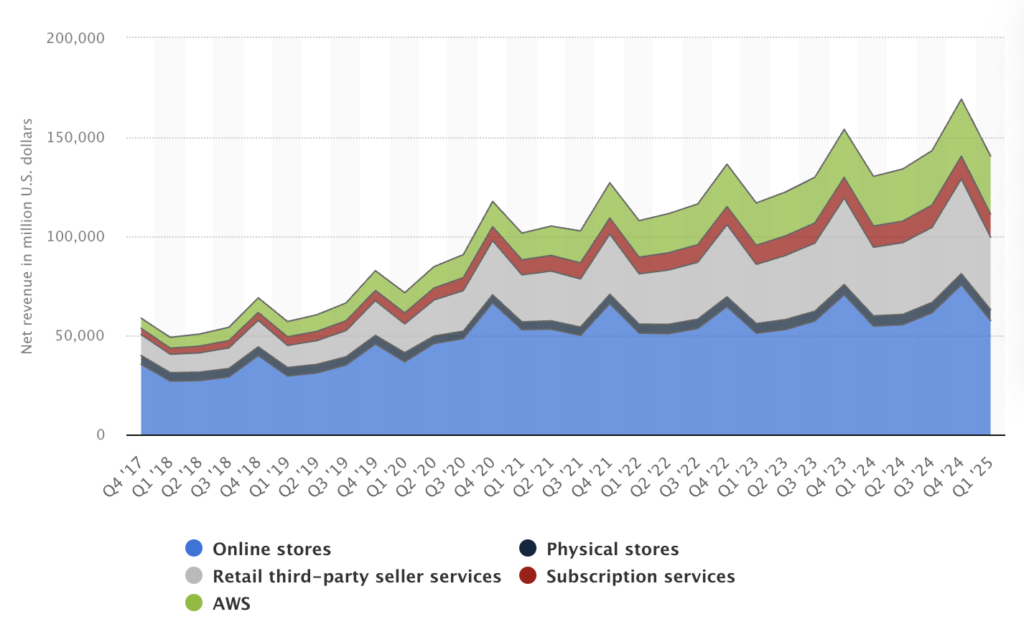
In the first quarter of 2024, Amazon.com saw a decrease in global net revenue across online stores when compared to the prior quarter, probably due to holiday season at the end of 2023. In terms of profitability, the online stores segment was followed by retail third-party seller services, with net revenues of 34.6 billion U.S. dollars.
These record breaking Prime Day numbers come shortly after California’s Labor Commissioner’s Office imposed a hefty $5.9 million fine on Amazon in May 2024. This was due to breaching a state law designed to safeguard warehouse workers from hazardous work conditions caused by excessively high quotas.
Global net revenue of Amazon.com from 4th quarter 2017 to 1st quarter 2025, by product group
(in million U.S. dollars)
For ecommerce sellers, this Prime Day serves as a crucial rehearsal for the major Q4 sales events. By analyzing and learning from your Prime Day performance, you’ll be better prepared for the high-stakes periods of Thanksgiving, Black Friday, Shop Small Saturday, and Cyber Monday, ensuring you’re well-equipped for a successful Q4.
1. Inventory Recount
Conduct a cycle count for your highest volume SKUs and highest margin SKUs. For some sellers they are the same, for others, they are very different products. Get ahead of your next stock order, ensuring you maintain optimal stock levels and avoid potential disruptions.
Inventory variance in inventory management refers to the discrepancy between recorded and actual physical inventory levels, which can be positive or negative. This can result from human error, theft or loss, supplier errors, process inefficiencies, or product misplacement. Accurate inventory management is crucial for minimizing costs and ensuring smooth operations, which is achievable through regular audits and reliable inventory management systems.
2. Review Sales Data
After Prime Day 2025, it’s crucial to review your sales data to identify best-sellers and underperformers. Analyzing this data can reveal surprising new high performers, such as a particular colorway or an entirely different SKU that unexpectedly gained popularity. Focus on metrics like sales velocity and conversion rates to understand which products moved quickly and which struggled to attract buyers. Additionally, examine average order value and cart size to see if customers were purchasing more items per transaction or spending more per order. Assessing how competitors performed during the event can also provide valuable insights, helping you refine your strategies for future sales events. This detailed analysis will help you make informed decisions about inventory restocking, marketing strategies, and future promotions.
Analyze Prime Day 2025 performance across FBM and FBA; compare conversion rates, sell-through, ad spend, and costs per acquisition by channel. You can identify best-sellers and underperformers by analyzing several key metrics. Start by looking at total sales volume to see which products sold the most units. Sales velocity, or the speed at which items sold, is another critical indicator of a best-seller. High conversion rates, which show the percentage of visitors who made a purchase, can also point to successful products. See this in Seller Central by looking at your Unit Session Percentage or your Order Item Session Percentage. By combining these metrics, you can gain a comprehensive understanding of your inventory performance.
3. Process Returns Quickly
Efficiently processing returns is essential for maintaining customer satisfaction and managing inventory post-Prime Day. If you are an FBA seller, Amazon handles the returns on your behalf. Store owners must ensure that their return policies are clearly communicated to customers and that any necessary actions, such as refunds or replacements, are promptly executed through the Amazon Seller Central dashboard.
Tip: If you were also running sales on your webstore, processing returns should be straightforward. In Shopify, navigate to the order you wish to return, click on “Return Items,” select the items being returned, and generate a return label. Shopify allows you to restock the returned items automatically and issue a refund or store credit to the customer. By swiftly handling returns, you can maintain high customer satisfaction and keep your inventory levels accurate.
For those using ShipStation, the platform offers a robust returns management feature. This tool allows you to create and manage return labels, track return shipments, and process refunds or exchanges seamlessly, ensuring a smooth experience for both you and your customers.
Are you an Amazon FBA seller? If so, for most claim types, you should wait 30 to 45 days from the date of the error, to give Amazon sufficient time to process your Amazon FBA refund according to their own policies and processes.
Efficiently processing returns is crucial for maintaining customer satisfaction and effectively managing inventory after Prime Day. Keep on top of returns, return rates, and refunds to ensure smooth operations. Make sure items don’t get lost during the return process by tracking them meticulously and confirming receipt. Assess each returned item to determine whether it can be resold or if it’s no longer sellable, helping you manage inventory effectively. Additionally, be mindful of your return-to-sales ratio to avoid incurring additional return fees. By staying on top of these aspects, you can maintain accurate inventory levels and manage your returns efficiently.
4. Review Customer Feedback
Gathering and analyzing customer feedback is crucial for enhancing your business operations and product offerings following Prime Day. Use customer reviews and ratings to determine if your fulfillment processes were accurate or if there are issues with product quality. Pay close attention to any recurring themes or concerns that may indicate problems. If products did not meet customer expectations, consider updating your product listings and photos to better reflect what customers will receive. This is also the time to communicate customer feedback to the supplier or manufacturer about the problem and be fixed at the source if it’s not related to fulfillment.
By addressing these areas based on customer feedback, you can enhance your offerings and better align with customer expectations. Continued negative reviews will damage the marketplace list rankings, so learn from the Prime Day spike. See what you can control, like fulfillment and product photos/descriptions, and what needs to be passed on to the supplier or manufacturer.
5. Restock Popular Items
After a robust cycle count and accounting for returns, you can now reorder from suppliers or transfer warehouse-to-warehouse to replenish FBA stock. An accurate purchase order quantity will help with fewer supplier deliveries, reduce shipping costs, and avoid stockouts.
Restocking popular items promptly is crucial to maintaining sales momentum after Prime Day. Utilize barcode scanning to streamline transfer orders and shipments to FBA. Consider your supply chain and inventory stocking strategy: decide whether to bulk up for the upcoming Q4 or manage with a few smaller shipments based on your budget, storage capacity, and actual needs.
A common myth to bust is that buying in bulk is always the best strategy. While bulk orders can save on shipping costs and ensure you have enough stock, they can also tie up capital and storage space. Evaluate your sales trends and inventory turnover rates to find the right balance between bulk ordering and smaller, more frequent shipments. Smaller, more frequent shipments are a cashflow strategy to have inventory on-demand, but the downside is that you can’t take advantage of bulk supplier deals or reduced shipping costs. If your lead time is short, you may be well-suited for on-demand inventory. If your lead time is long, consider buying in bulk.

6. Warehouse Operations
Assessing warehouse efficiency and accuracy is essential for smooth operations and customer satisfaction. First, verify that your items were delivered to Amazon Fulfillment Centers at the right time, location, and with correct counts. This ensures your stock is available for customers without delays. Next, evaluate your team’s efficiency by examining pick rates—consider if additional training is needed to improve performance. Additionally, review your quality assurance (QA) and quality control (QC) processes to identify any deficiencies.
Now that Prime Day is over, you can take the time to reflect and think about warehouse and storage room organization. Are there zones you want to add or remove? Do you need to condense or expand shelving? Both of these can be done with warehouse barcode labeling. Many businesses have a designated FBA transfer zone for stock specifically labeled and reserved to be sent to Amazon FBA so it’s not mixed in with the other fulfillable stock.
7. Understand your FBA Financials
Understanding your financial performance after Prime Day is crucial for assessing the effectiveness of your strategies. Review Prime Day specials to analyze how the promotions impacted your margins.
As a seller on Amazon, you can find cart size and cart value data within the Amazon Seller Central under the “Reports” section. Look for the “Business Reports” and then the “Sales Dashboard” or “Detail Page Sales and Traffic by ASIN” reports to access this information. This data will help you understand the effectiveness of your promotions and sales channels.
Compare the performance of different sales channels if you’re a multichannel seller—such as Walmart and your webstore (i.e., Shopify, BigCommerce, Magento, etc)—to determine which ones were more profitable. Evaluate cart size and value in relation to ad spend to identify which channels drove the best sales orders. Also, keep an eye on the shopping cart abandonment rate for lost opportunities. If cart size or cart value is low, consider bundled products to drive up sales.
Finale has built-in accounting tools for you to track COGS, landed costs, sales per channel, and much more. If you need in-depth help with cleaning up your books after Prime Day 2025, talk to one of our many finance and accounting partners. Really want to prepare yourself for next year’s Prime Day? Consider connecting to A2X for even better reconciliation (your CPA will thank you).
What Was Different About Prime Day 2025?
Inventory management for FBA was especially challenging this year. Leading up to Prime Day, Amazon tightened FBA storage capacity limits for July 2025, even more than in June, to control warehouse congestion.
Many sellers found their stock limits reduced right before the big sale. This forced some to get creative: Amazon promoted its new Amazon Warehousing & Distribution (AWD) service as an overflow solution. Sellers using AWD (Amazon’s 3PL storage network) could send inventory to Amazon’s warehouses well in advance (AWD inventory cut-off was May 15th) to stage stock for Prime Day.
Products stored via AWD are ready to be fed into FBA and carry the Prime eligibility, so this helped merchants with large inventories or those constrained by FBA limits. By using AWD, sellers ensured their items were distributed in Amazon’s network and could handle the Prime Day surge.
Track Your Amazon Margins
Despite these challenges, understanding margin benchmarks is important. According to industry surveys, most Amazon sellers (over 55%) maintain a net profit margin above 15% in general, and about 38% of sellers make over 20% margin. Only a small minority (around 8–9%) operate at extremely low margins (<5%) or at a loss.
For Prime Day 2025 specifically, many sellers saw margin compression due to a few factors
- Steeper discounts were needed: Needed for the deal badge
- Advertising costs spiked: cost-per-click on ads typically rises during Prime Day week
- Higher fulfillment and storage fees: Amazon’s FBA fees went up in 2025, and some sellers paid extra for expedited shipments to stock FBA in time or used AWD storage at additional cost
Let’s Get Started
Now that Prime Day 2025 is over, it’s a critical time to evaluate your business performance and optimize your strategies. By reviewing sales data, processing returns efficiently, gathering customer feedback, restocking popular items, enhancing warehouse efficiency, and understanding your financials, you can make informed decisions that drive future success. Avoid chaos by managing your FBA stock in Finale Inventory. Finale makes managing FBA inventory easier than in Seller Central.
