

Choosing the right inventory management system can make or break your operations, especially if you’re selling across multiple channels. Two popular options in the market are Fishbowl and Finale Inventory, each offering distinct capabilities for inventory control, warehouse workflows, and order processing. In this comparison of Fishbowl vs Finale Inventory, we’ll break down the strengths and weaknesses of both platforms to help you decide which one best supports your business needs, particularly if you’re an ecommerce seller looking to grow without added complexity.
Fishbowl Inventory: Biggest Pro & Con
Fishbowl’s biggest strength lies in its manufacturing and production features, which are especially useful for businesses operating out of a single location or managing in-house production. It offers a desktop version integration with QuickBooks and a set of tools for order management and warehouse operations. However, Fishbowl’s most frequently cited drawback is its customer support experience. Many users report that the sales process overpromised features and functionality that didn’t meet expectations, and that ongoing support was limited or unhelpful after purchase. Fishbowl doesn’t have free support either; they have two plans for support, each of which costs extra.
Finale Inventory: Biggest Pro & Con
Finale Inventory shines when it comes to multichannel ecommerce. Its biggest advantage is its flexibility and ability to consolidate SKUs from different marketplaces, keep real-time stock levels accurate, and automate complex workflows like reordering, stock transfers, and barcode-driven order fulfillment. Finale is quick to implement and ideal for high-volume sellers. One limitation is that Finale is less focused on manufacturing and more focused on finished goods. There are many features that are standard on all Finale plans, like transfer orders, that can only be used on Fishbowl’s premium/advanced plan. Another thing that Finale lacks compared to Fishbowl is LIFO/FIFO.
Fishbowl vs Finale Inventory – Cost & Pricing Comparison

| Pricing | Finale | Fishbowl |
| Entry-level pricing | $99/month – $420/month: No Commitment | $349 Fishbowl Drive: Annual Commitment |
| Premium-level pricing | $649-$949+ /month or custom rate for larger accounts | $549 Fishbowl Advanced + Paid Add-ons |
| Onboarding | Free: Bronze plan and up | $3,000-$10,000+ (Required Add-ons) |
This highlights Fishbowl’s true cost, which includes add-ons for integrations, manufacturing, point of sale (POS), and onboarding, making Finale the more cost-effective choice for ecommerce sellers.
One thing to note about Fishbowl’s cost is the cloud hosting fees. If you want Fishbowl cloud hosted on their servers, you must pay for that plus the subscription, and there are data size limits that would continually grow in cost as your account accumulates data. This is not included in the base price, but should be factored in when thinking about the total price tag of Fishbowl’s system.
Fishbowl vs Finale Inventory – Product Comparison

Centralized Inventory & Warehouse Management
| IMS & WMS Features | Finale | Fishbowl |
| See all marketplaces and transactions | ✅ Included at all price tiers | ✅ Add-on Fishbowl Commerce |
| Support for single order, wave, and zone picking, plus pick and pack | ✅ | ✅ |
| Multi-warehouse support | ✅ | ✅ |
| SKU consolidation and SKU mapping | ✅ | ❌ Not built-in, not natively supported |
| Timekeeping to track employee hours | ❌ | ✅ |
SKU consolidation and SKU mapping are processes that help ecommerce sellers and warehouse teams manage product data more efficiently across sales channels.
SKU consolidation means grouping different listings of the same product (with different SKUs) under one internal product ID in your inventory system. SKU mapping is the process of linking those external SKUs—like Amazon ASINs, Shopify variant SKUs, or warehouse barcodes—to that single internal product.
This is important because without consolidation, the same product sold on different platforms looks like separate items in your system, leading to inventory errors, duplicate stock counts, and fulfillment confusion. With proper SKU mapping, all sales and stock movements—no matter where the order comes from—are tracked against the same item, keeping inventory accurate and fulfillment streamlined. It’s a must-have for multichannel sellers and growing warehouse teams. For example,
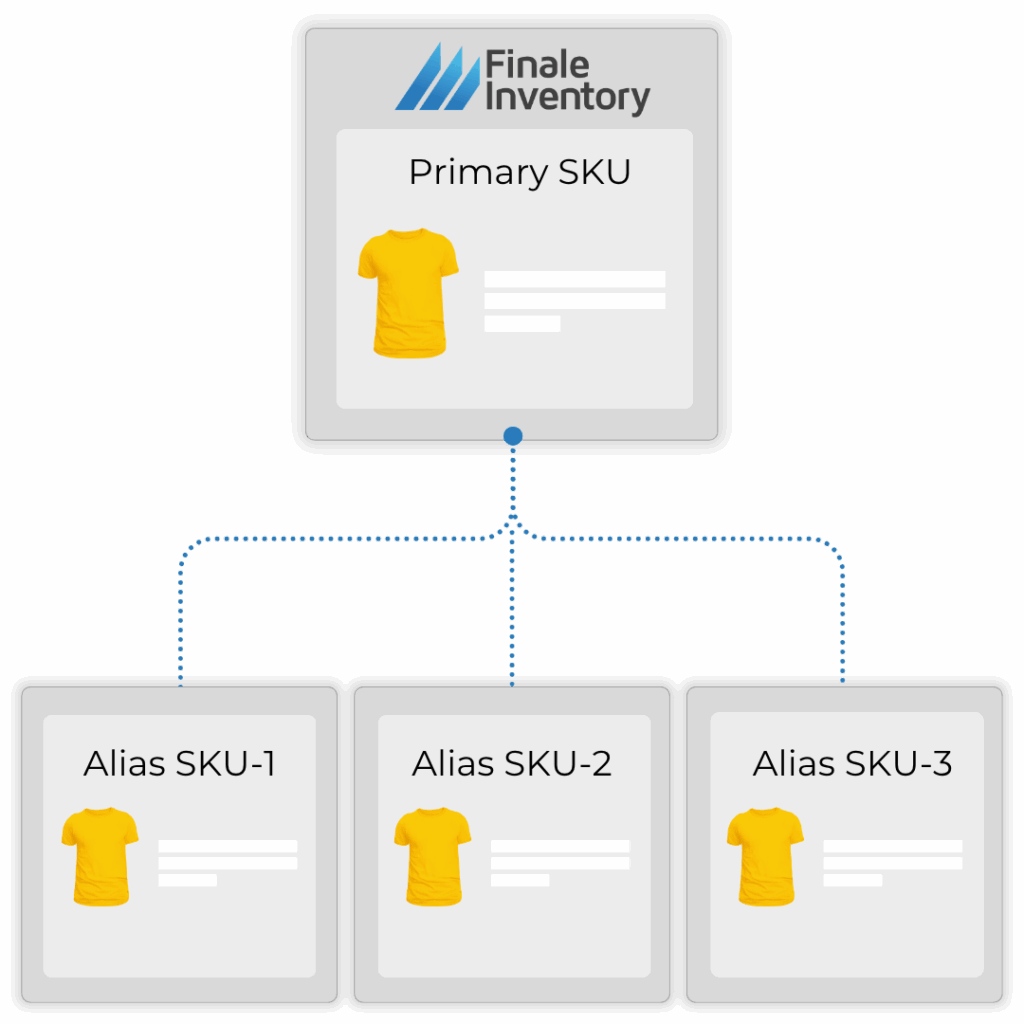
With SKU mapping and consolidation, you tell your inventory system that all three of these SKUs refer to the same product. So when an order comes in from Amazon for ASIN-123, the system knows to reduce the stock for SKU-001. This keeps your inventory accurate across all channels and ensures your team picks the right product, no matter which SKU appears on the order.
Amazon: ASIN-123
Shopify: WPRO-BLK
Warehouse label: SKU-001
Barcode Scanning & Label Printing
| Mobile Barcode Scanning Features | Finale | Fishbowl |
| Smartphone barcoding app | Android | Android and iOs |
| Barcode scanning devices | Any scanning device connected to Android hardware: wired or wireless | Wired and wireless |
| Supports simultaneous scanning | ✅ | ✅ |
| Supports barcode label creation and printing for warehouse shelves, bins, and zones. | ✅ | ✅ |
| Barcode and product ID connected within the mobile app, enabling lookup on the device | ✅ | ✅ |
| Mispick alerts | ✅ | ✅ |
Barcode scanning and label printing are critical tools for keeping high-volume warehouse operations accurate and efficient. When your barcode system is directly connected to your inventory management system (IMS), every scan updates inventory in real-time, whether you’re picking, receiving, or conducting a stock transfer. This connection eliminates manual entry errors and gives your team confidence that the right items are being moved to the right place. For sellers managing expiration-sensitive products (using lot IDs) or serialized items like electronics, barcode scanning isn’t optional—it’s the only practical way to track inventory accurately at scale. Without it, warehouse staff are forced to manually enter product details, which slows down fulfillment and increases the risk of costly mistakes. With both of these systems, you can also print barcodes for bins and shelf locations, so staff can scan where items are stored or picked from, keeping operations clean, traceable, and fast.
Kits & Bundles
| Kits & Bundle Features | Finale | Fishbowl |
| Support for pre-packaged and virtual kits and bundles | ✅ Included at all price tiers | Kitting available on Advanced plan |
| Support for assigning alias SKUs | ✅ Included at all price tiers | Associated products available on Advanced plan |
| Support for tracking individual component SKUs (Child SKUs) | ✅ Included at all price tiers | Bill of materials (BOM) only on Advanced plan |
| Order fulfillment picking for kitted or bundled products | ✅ Included at all price tiers | Not fully supported on Drive |
Kitting and bundling allow sellers to group multiple products together and sell them as a single unit, whether it’s a pre-packaged gift set, a subscription box, or a custom order assembled on the fly. It’s a powerful strategy for increasing average order value, simplifying promotions, and creating a better customer experience. Without a proper inventory management system (IMS), managing kits can quickly become a mess. If your system doesn’t break down a bundle into its individual components, you risk overselling items you don’t have in stock or misshipping incomplete kits. An IMS like Finale tracks both the bundled product and its child SKUs, so inventory levels stay accurate, pick lists are complete, and fulfillment runs smoothly—even as kits are assembled or shipped. This is especially important for sellers offering custom kits or managing a mix of virtual and pre-assembled bundles. The main differentiator in this comparison is that Finale offers the same kitting functions as Fishbowl but at a lower cost. You can have full access to kitting even on Finale’s self-starter plan, whereas you need to be on Fishbowl Advanced to use these tools.
Purchasing & Procurement
| Finale | Fishbowl | |
| Low Stock Alerts | ✅ | ✅ |
| Purchase Order Automation | Automated purchase order recommendations and purchase suggestions | Use auto purchase orders to speed up the reordering process. |
| Purchasing History | ✅ | ✅ |
| Stock Replenishment Automation | Calculated on min/max or using sales velocity with lead time, safety stock, growth %, and inventory days considerations. | AI suggestions |
| Support for applying payments to multiple invoices | ✅ | ✅ |
| Support for recording and applying seller credits (vendor credits) | ✅ | ✅ |
Accounting Tools
| Finale | Fishbowl | |
| Built-in Accounting Methods | Weighted Average Cost | Weighted Average, Standard, FIFO, LIFO |
| Built-in COGS Calculations | ✅ | ✅ |
| Built-in Landed Cost Calculations | ✅ | ❌ |
| Built-in 3-way match audit | ✅ | ❌ |
| Built-in stock valuation | ✅ | ✅ |
| Supports scheduling reports to Google Suite | ✅ | ❌ |
| Automatically tracks the source of orders for integrated sales channels | ✅ | ❌ Not native or built-in |
| Multi-currency capability | ❌ | ✅ |
An inventory finance system tracks the value of your stock, calculates Cost of Goods Sold (COGS), and records inventory-related transactions in your general ledger. This allows businesses to make informed financial decisions based on real-time inventory data, stock movements, and costs.
Gain visibility into profitability by SKU, warehouse, or sales channel. These accounting tools act as a bridge between your operations and your bookkeeper to help you stay financially accurate without the manual work. Finale offers robust financial auditing tools like landed cost calculations and the 3-way match, built-in. The 3-way match is an accounting process used to verify an invoice against a purchase order and a received inventory. It’s a financial auditing practice to make sure that the stock ordered on the purchase order actually arrived at the warehouse and the invoice is paid to the supplier.
Some companies buy in one currency, operate in a second, and sell in a third currency. For example, you buy from a Chinese supplier in Yuan, you operate in Euros, but sell in USD. If you need to track multiple currencies or require FIFO/LIFO, then Fishbowl has the upper hand. Finale Inventory is currency blind, which means the number you input can be any currency, but it must stay consistent throughout.
Reporting and Analytics
| Finale | Fishbowl | |
| Analytics dashboard | ✅ | ✅ |
| Automated reports sent to email | ✅ | ✅ May require customization or assistance |
| Users can customize reports | ✅ No additional cost to customers | ❌ Available via paid third-party services (~$99–$500+) per report |
Fishbowl vs Finale Inventory – Support & Implementation

| Finale | Fishbowl | |
| Onboarding support | Free guided onboarding for Bronze plans and up | Fishbowl Implementation Package is typically an extra cost that is separate from the initial software purchase. It’s an add-on service that provides dedicated support and training |
| Time to implement | 2-4 weeks on average | 4-12 weeks on average |
| Live Chat Support | No, only call or email tickets | Form/ticket submission available |
| Phone / Zoom Support | Yes, for Bronze plans and up | Yes |
| Email Support | Yes, guaranteed response within a few business hours – faster for premium plans | Yes, response times may vary |
| Dedicated account manager | Dedicated Implementation Manager for Bronze plan and up. Account Manager for Platinum plans and up | May require a consulting agreement. Implementation packages generally start around $5,000 and can increase depending on the complexity of the setup and the number of users involved. |
Fishbowl vs Finale Inventory – Product Reviews

Capterra Reviews: Fishbowl vs Finale Inventory
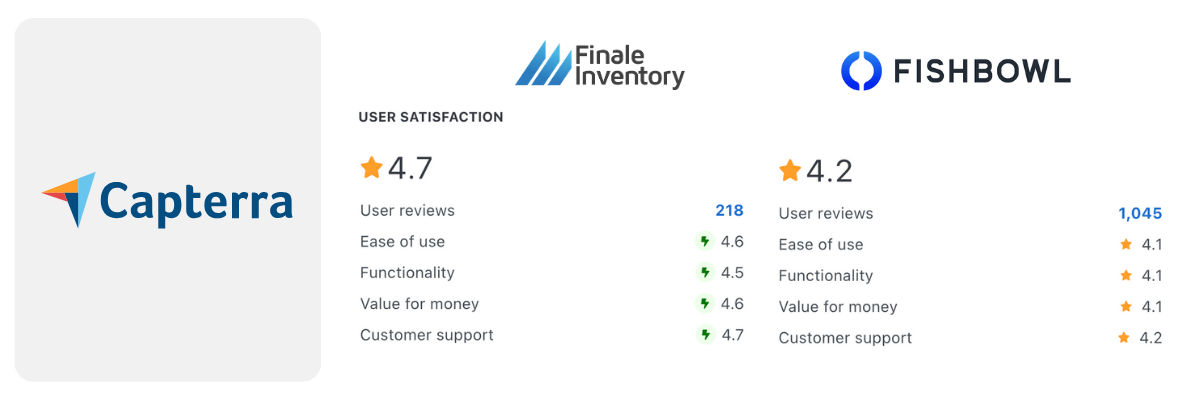
Finale Inventory wins user satisfaction. Read the full article that compares Fishbowl and Finale Inventory on Capterra.
G2 Reviews: Fishbowl vs Finale Inventory
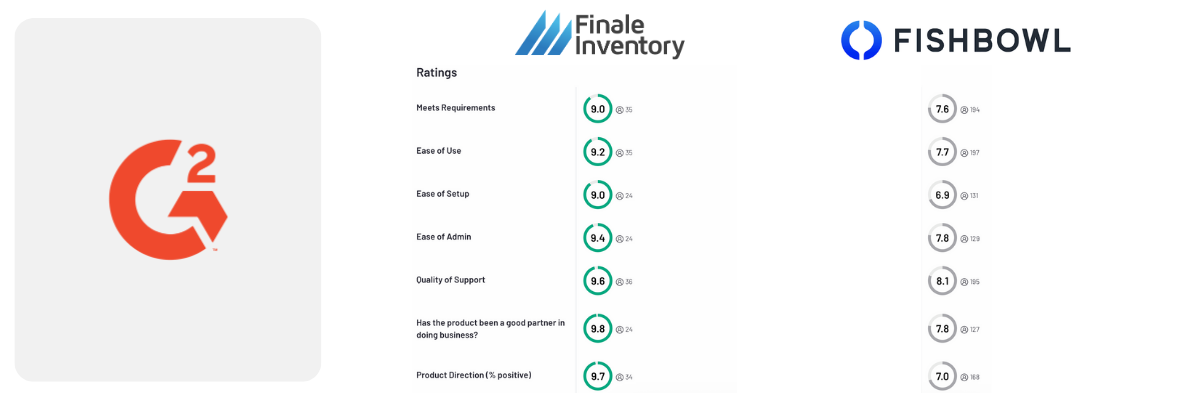
Finale Inventory wins customer ratings. Read the full article that compares Fishbowl and Finale Inventory on G2.
GetApp Reviews: Fishbowl vs Finale Inventory

Finale Inventory wins overall ratings, and more users recommend this software. Read the full article that compares Fishbowl and Finale Inventory on GettApp.
In all three software customer reviews, Fishbowl has more number of reviews but Finale is higher rated, mainly scoring higher in general satisfaction, customer service, and ease of use compared to Fishbowl. Read what real Finale customers have to say about their experience. Customers often have lower error rates, save on staffing, and can expand into new selling channels with the power of Finale – see for yourself.
Fishbowl vs Finale Inventory – Integrations Comparison
Marketplace Integrations
| Marketplace | Finale | Fishbowl |
| Amazon | ✅ | ✅ Fishbowl Drive needs an additional plugin |
| BackMarket | ✅ | ❌ |
| eBay | ✅ | ✅ |
| Etsy | ✅ | ❌ |
| Faire | ✅ | ❌ |
| NewEgg | ✅ | ❌ |
| NuOrder | ✅ | ❌ |
| Overstock | ✅ | ❌ |
| Rakuten | ✅ | ❌ |
| Sears | ✅ | ❌ |
| SHEIN | ✅ | ❌ |
| Temu | Coming soon | ❌ |
| TikTok | ✅ | ❌ |
| Walmart | ✅ | ✅ |
| Wayfair | ✅ | ❌ |
| Wish | ✅ | ❌ |
Sales Channel Integrations
| Sales Channel | Finale | Fishbowl |
| AmeriCommerce | ✅ | ❌ |
| BigCommerce | ✅ | ✅ |
| CoreCommerce | ✅ | ❌ |
| Magento | ✅ | ✅ |
| OpenCart | ✅ | ❌ |
| PrestaShop | ✅ | ❌ |
| Shopify | ✅ | ✅ Required to purchase a connector, add-on module |
| Shopify Plus | ✅ | ✅ Required to purchase a connector, add-on module |
| Volusion | ✅ | ✅ |
| WooCommerce | ✅ | ✅ |
| ZenCart | ✅ | ✅ |
| Zoey | ✅ | ❌ |
Selling through your own sales channel—like a Shopify, WooCommerce, or BigCommerce storefront—gives you full control over branding, customer experience, and margins, unlike marketplaces like Amazon, where fees are high and customer data is limited. But self-managed storefronts also require you to handle everything from marketing to fulfillment. That’s why it’s critical to connect your store directly to your inventory management system (IMS). A direct connection keeps stock levels, pricing, and order updates in sync automatically. Many businesses even run multiple storefronts—such as several Shopify accounts—under different brands or for different purposes, like one for DTC and another for wholesale (B2B). With the right IMS, all of these stores can pull from the same centralized inventory, making it easier to maintain accurate stock, streamline operations, and grow across channels without duplication or confusion.
Multichannel Management Tool Integrations
| Multichannel Management | Finale | Fishbowl |
| Acenda | ✅ | ❌ |
| GeekSeller | ✅ | ❌ |
| Rithum | ✅ | ❌ |
| SureDone | ✅ | ❌ |
| Zentail | ✅ | ❌ |
Managing multiple ecommerce marketplaces—like Amazon, Walmart, and Shopify—can quickly become overwhelming. Sellers often struggle with duplicated effort, inconsistent product listings, and delays in fulfilling orders across channels. That’s where Multichannel Management tools come in. These platforms act as a centralized control hub, allowing sellers to list products, sync pricing, manage orders, and route fulfillment from one system instead of logging into each marketplace individually. These tools are designed to solve these coordination problems by automating product listing updates, streamlining order flow, and integrating with fulfillment partners. The result is faster operations, fewer errors, and a more scalable ecommerce strategy.
Point of Sale (POS) Integrations
| POS Features | Finale | Fishbowl |
| Costs | Included at all price tiers | The built-in POS system is included on both Drive and Advaned. 3rd third-party POS systems need the Advanced plan and may require an additional add-on plugin. |
| Built-in | ❌ | ✅ Included on Drive and Advanced |
| Clover POS | Coming soon | ✅ Need a plugin module |
| Lightspeed POS | ✅ | ❌ |
| Shopify POS | ✅ | ✅ Need a plugin module |
| Square POS | ✅ | ✅ Need a plugin module |
A Point of Sale (POS) system is the software and hardware used to complete transactions in a retail setting—whether it’s in-store, at a pop-up event, or through a mobile checkout. It records sales, processes payments, and often tracks customer data. However, if your POS isn’t directly connected to your inventory management system (IMS), problems begin to accumulate quickly. Stock levels can become inaccurate, especially if you’re also selling online, which can lead to overselling or missed sales due to outdated quantities. Sellers may end up manually reconciling inventory or struggling to fulfill orders accurately across locations. When your POS and IMS are connected, inventory updates occur in real-time after each sale, ensuring you always know what’s available, regardless of where the sale takes place. This connection is critical for keeping operations smooth and scalable, especially for businesses with both retail and ecommerce channels.
FBA, AWD, & Virtual Warehouse Integrations
| Finale | Fishbowl | |
| Cost | Included at all price tiers | Add-on module/plug-in |
| Amazon FBA | ✅ | ✅ |
| Amazon AWD | ✅ | ❌ Not supported natively |
| Vi |
