

For retailers like you, taking your business online is the next big milestone. The trend toward online shopping has been rising steadily each year. In 2017, e-commerce brought in $2.3 trillion in sales, and by 2019, that number had increased to $3.5 trillion. By 2023, projections say total sales will rise to $6.5 trillion. One thing is clear — the internet has revolutionized the way consumers shop. For a brick-and-mortar retailer, the world of e-commerce is hard to ignore.
There are many reasons to shift from brick-and-mortar to online, and putting in the effort now can have lasting results. The good news is that you already have experience in retail. You have carefully selected merchandise your customers love, and you have a robust customer base that visits your shop regularly. The back storage room you use to replenish your sales floor inventory can easily double as an e-fulfillment center. With all these assets and industry know-how you’ve gained, you’re in a great position to learn the ropes of e-commerce.
Advantages of Selling Online
There are many benefits to moving your store online, both now and in the long term. While they have their similarities, e-commerce and in-person retail offer different experiences. Many of your shoppers love walking the aisles and interacting with items before buying. Online shopping can be enticing because it allows shoppers to save time and compare prices before checkout. By transitioning your physical business to an online store, you can enjoy the advantages of both worlds.
Short-Term Benefits of Transitioning to an Online Store During the COVID-19 Crisis
In March 2020, the whole country came to a standstill as businesses closed, and people around the country prepared for quarantine. While customers flocked to grocery stores to stock up, nonessential retailers shut down. Some were able to maintain operations through a makeshift or existing curbside pickup program. Others temporarily shut their doors. For those still closed or concerned about reopening, adapting to online retail may be the right solution.
In May, online spending totaled $82.5 billion, which was a record-breaking 77% year-over-year increase. In the same month, buy online, pick up in-store (BOPIS) grew 195%. It’s clear that in the short term, retailers have a lot to gain by going digital. Bringing your brick-and-mortar store online during the pandemic can allow you to:
- Keep your customers and employees safe: As the COVID-19 pandemic continues, many people are still afraid to venture out in public. Large gatherings, like those found in a crowded store, can pose a health risk. Online shopping presents a way for shoppers to avoid strangers and reduce how many people your employees come in contact with.
- Sell where your customers want to shop: Many customers want to support beloved small businesses during the current economic downturn. They want to shop local without putting themselves at risk, and buying online is an excellent way to do that.
- Meet capacity restrictions: As states reopen, many businesses have to limit their capacity. Social distancing and restricting shopping hours for frequent cleanings can affect your ability to serve your customers. Online shopping gives you the ability to sell to anyone at any time. Funneling some of your customers to your e-shop means smaller crowds at your location without sacrificing sales.
- Prepare for the future: The current conditions have caused many people to shop online for items they usually buy in-person. While curbside pickup or delivery feels unusual for some customers, they’re developing new habits now. Many are learning how convenient it is and may continue long after the pandemic is over.
Long-Term Benefits of Selling Online to Drive Success
E-retail began growing long before COVID-19 and will continue after it is behind us. Making the online retail migration now will help your business stay competitive in your area and worldwide.
Integrating a brick-and-mortar retail strategy with online selling produces an omnichannel shopping experience. With consistency across online and offline brand interactions, you create a seamless experience between all retail channels. An effective multichannel strategy can drive your online shoppers to visit you in-store, and vice versa.
Adding an e-shop to your business can allow you to:
- Sell 24/7: One of the many advantages for e-commerce and consumers is the ability to remain open 24 hours a day. Paying employees to work retail at 3 a.m. may not make good business sense. Instead, you can easily snag late-night shoppers from the comfort of their living rooms with an e-commerce website. You’ll also open your store to people who are unavailable during your regular hours.
- Diversify your customer base: You probably already know that shopping preferences fall along some generational lines. While tech-savvy Millennial and Generation Z shoppers are more likely to make online purchases, Baby Boomers and older generations favor in-person retail. Generation X customers seem to like both shopping experiences. By taking your brand online, you can make contact with those who want to shop digitally.
- Find new customers: Digital marketing is an effective and affordable way to earn new business. It’s much easier to get someone to follow a link than to drive somewhere, hunt for products and wait in line. Marketing across social media channels and search engine optimization (SEO) can open you to new customers. Your website can also track users who visit your e-store so you can retarget them later. You can gain more conversions with a smart online marketing strategy.
- Sell anywhere: Physical stores can only serve the surrounding area. An e-commerce platform opens you up to the entire country and even international sales. Your geographical market is bound only by your shipping radius and the number of customers you can serve with the level of inventory you have.
- Increase scalability: Online stores have an incredible ability to grow. They have a smaller overhead than physical retail while also expanding your customer base. With the higher level of data, you can optimize your inventory for your best-sellers and strategically diversify your offerings. With so much of the sales process happening digitally, e-retail is less labor-intensive. All these benefits align to offer rapid scalability for your business.
A Step-By-Step Guide to Move Your Physical Store Online
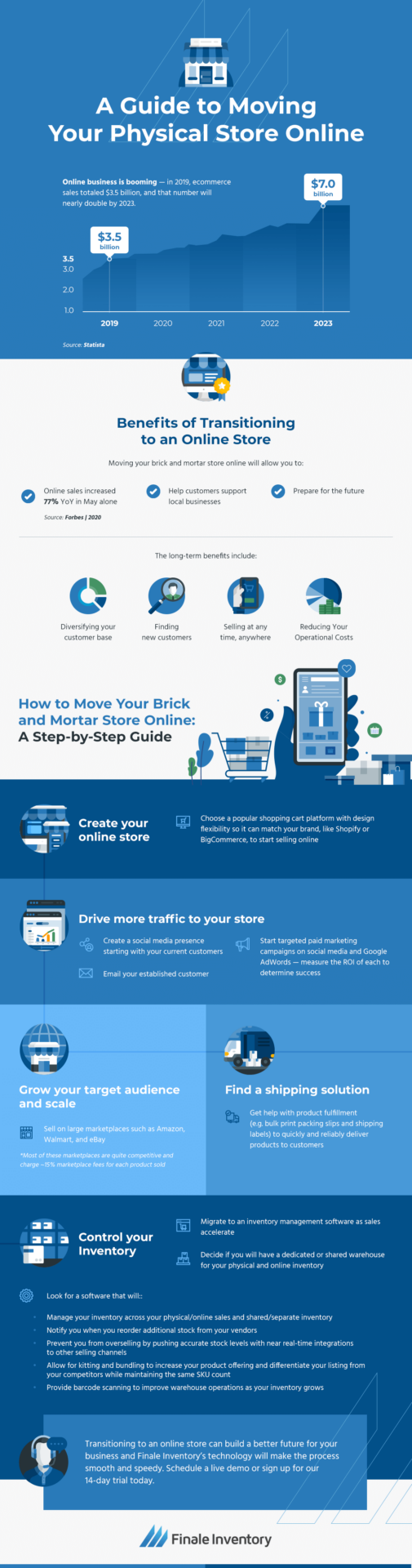
How do you transition from brick-and-mortar to online? The way you approach online selling can depend on your unique goals. Are you going 100% digital on a temporary or permanent basis? Or, are you launching an online store as a way to add a new channel to your existing retail business? As you customize your approach to your business needs, you can get your business ready for e-commerce in five steps.
1. Select a Shopping Cart Platform
First, you must digitize your aisles and cash register. A shopping cart platform is a service you use to create an online store. It will display your products in an easy-to-digest and searchable format. Each item will have an attractive picture, product description and price tag. You might even outfit each product page with customer reviews. A shopping cart platform will take payments and check out customers. It can also calculate taxes and shipping expenses and guide your customers to complete their transactions.
Some shopping cart platforms will create a brand new e-commerce website, while others can connect to your existing website. You can even find advanced features like customer loyalty plans and abandoned cart recovery. If you need a fast, short-term solution, you can likely use an out-of-the-box software with a low-cost plan. Many options have quick start features that can get an online store up and running in one day.
For a high sales volume and a long-term e-commerce plan, you may want a service that offers customization and the ability to upgrade. Some providers can help you optimize for search engines while also giving you a high level of control over the technology. You might need specialists to handle these features.
As you select a shopping cart provider, you should evaluate features like:
- Usability on your end and your customers’ end.
- SEO capabilities to enhance your digital marketing.
- Design options that reflect your brand and look attractive.
- Customizable features and plugins that meet your needs.
- Integration with other tools like inventory control software, online marketplaces and accounting programs.
- Diverse payment options that meet your customers’ preferences.
- Customer support you can count on.
- Payment plans and transaction fees that fit your business needs.
2. Prepare Your Website and Online Presence for E-Commerce
If you already have a website, you might need some tweaks to reflect your new online store. First, modify your homepage to drive users to your product pages with promotions and news about your online store.
Your customers might have questions about your new digital storefront, especially if they aren’t used to online shopping. Give your customer service team a break by creating an FAQ page that can field these questions. In particular, your customers may wonder about your shipping services and returns and exchange policy.
Once your website is optimized for online shopping, you need a way to announce you’re online and ready to accept orders. Social media can be a critical part of this strategy. Your social platforms are an excellent way to broadcast your new e-store and post about promotions and new products. It’s also a good idea to ramp up paid ads and retargeting to get the most out of your new online selling platform.
Next, email your existing customers to tell them about your new online retail services. Any communication channel you can use to get the word out will help your transition have a good start. It’s better to over-communicate your launch than under-communicate it.
3. Streamline Inventory Control With Inventory Management Software
As a veteran retailer, you know how important inventory is to the success of your business. Merchandise is an investment, and many of your assets are tied up in it. It’s crucial to move it quickly and simultaneously restock shelves to keep your aisles attractive and avoid losing customers.
Managing retail inventory is complicated for many reasons. Sales can fluctuate, making it difficult to predict how much of a product you need to stock. If you order a set amount each time, you can run into issues like overstocking and understocking. When you’re understocked, customers may come to your store on the hunt for a product they won’t find, and you miss out on sales opportunities. It’s even more frustrating if a product is out of stock on the sales floor and in stock in the back room. Meanwhile, overstocked products take up precious shelf space and rack up storage costs.
All those issues become magnified when you add an e-commerce selling channel. Your online presence can be unpredictable at first. You may suddenly start seeing orders from customers outside your usual location, impacting sales and adding complexities to your sales forecasting.
Understocking presents new dangers beyond missed sales opportunities. Without an accurate inventory count, your shopping cart platform will continue to sell products after they go out of stock. Then you have customers who have paid you money and expect a product to arrive at their doorstep. You can either delay shipping until the restocked products arrive, place customers on a waitlist or refund their orders.
An overstock can create additional headaches when e-commerce represents a significant expansion of your business. When you’re scaling up, an e-shop can mean a more extensive inventory. So when products get overstocked, they may be overstocked in larger quantities, taking up more space and costing you more storage.
To stay successful as you add e-commerce to your store, manage your stock with inventory control software. An online inventory management tool, like Finale Inventory, helps you navigate the unpredictable. It automatically tracks and updates your inventory levels based on sales and incoming shipments. Rather than taking stock at set intervals after manual counts, your stock numbers rise and fall in real time.
Here are a few of the other features you can access with automated inventory tracking for your online and physical store:
- Accurate sales forecasting: Finale Inventory makes sales predictions by tracking your sales velocity. With this data, you can reorder products in the amounts you need to cover e-commerce and physical location sales. You can even look at forecasting separated between your online and in-person sales. Then, you’ll know much to bring out to the sales floor and how much to earmark for e-commerce fulfillment.
- Integration with other platforms: When you become a multichannel retailer, you need to update stock for your in-store team and across all selling channels. The more marketplaces you use, the more crucial this information becomes. With Finale Inventory, your real-time stock counts can be pushed to your shopping cart platform and online marketplaces. You will only sell the products you have and do not need to set aside merchandise for each platform to avoid out-of-stocks.
- Order management: When it’s time to replenish your stock, Finale Inventory makes the process simple. It can store information from your suppliers, so all you have to do is select the items you need to generate a purchase order. With sales forecasting and dynamic reorder reports, the software will tell you how many of each product to reorder. You’ll also know when to reorder based on your vendor’s lead times.
- Cost analysis: Finale Inventory tracks the rate you pay your vendors and the price you sell for. You can quickly analyze your average cost per unit, gross margins and other useful financial metrics.
4. Navigate a Shared Inventory Across Multiple Channels and Incorporate Product Kitting
Combining brick-and-mortar inventory with online inventory poses some unique challenges for many retailers. Buying habits can differ between online and offline shoppers, so your stock can behave differently in each channel. Selling online out of the same location as your physical business has a unique advantage because you can leverage your current storage space as an e-fulfillment warehouse. However, things can get complicated for your in-store team, because not everything in the back room is ready to place on shelves.
For example, imagine your store has 14 baseball caps in the back room. Your merchandising team keeps 10 hats on the rack to make the area look attractive and catch customers’ attention. Right now, the rack only has six. Before your online store, your team could grab four hats and place them on the stand.
Today, your online sales are booming, and you’ve sold 12 caps in the past few hours. They haven’t been packed yet, so it looks like you have 14 hats ready to shelve when you only have two. If your employees don’t know about these online sales, those hats will get shelved and sold, causing a shipping delay.
To avoid these issues while managing a shared inventory, you must account for availability as well as your physical stock. Monitoring this data can be hard if you only track inventory with manual counting. Finale Inventory makes it easy to handle multiple channel inventory by updating stock availability based on your online and in-store sales. Integration with your POS system means it can track in-store purchases, while integration with your online selling channels does the same for your e-commerce business.
With Finale Inventory, the moment products get sold online, they are removed from your availability — even before they get shipped. When you order items for replenishment, they get added to your availability before they arrive, so you avoid missing online sales for products that are about to arrive.
Sharing inventory online and in-store also opens the door for another popular service — curbside pickup. With live inventory tracking, your local shoppers can check a product’s availability before heading over to pick it up. With BOPIS, you can effectively merge your online and offline experience.
One crucial element and a potential hangup for a shared inventory is product kitting. E-retailers often sell items together as a kit to encourage customers to buy more merchandise. On an e-commerce website, the bundle will appear as a separate listing from the individual pieces, which can pose an issue for inventory tracking. To reconcile these matters, you can use Finale Inventory to subtract each item from their respective stock counts whenever a customer buys a kit.
5. Find a Reliable Shipping Solution
As a brick-and-mortar retailer, the element of e-commerce you may be least familiar with is shipping. Rather than having items carried out by the final customer, you must pack items and send them to your customers via mail or delivery service. While shipping may be new territory for you, finding a solution doesn’t have to be complicated. Here are a few options you can consider:
- Self fulfillment: If you’re using your storefront as the central hub for your e-commerce solution, you can ship items yourself. Using a fulfillment platform, you can ship items anywhere in the country and even internationally from your store or warehouse. You print the shipping labels, pack the orders and ship them out using the mail or a private carrier.
- Dropshipping: If your store doesn’t have enough inventory to handle an influx of online orders, you might consider dropshipping. In this case, your online customers will buy through you, and you’ll pass on the orders to your suppliers. Your vendor will pack and ship the order to your customers without you ever touching the inventory.
- Local delivery: Instead of shipping orders using a carrier, you can save on shipping by offering delivery for your local customers. In this case, your local customers will have orders delivered by your team. You can offer discounts for local delivery to encourage nearby shoppers to use this method.
Keep in mind how shipping costs will affect your business. It’s possible to offer free shipping by boosting your prices or covering the delivery yourself, and many shoppers prefer this option. If you choose not to provide free shipping, be transparent about shipping costs. Some shipping service providers will give you a live shipping rate based on your carrier’s pricing for a particular destination.
How Finale Inventory Can Help
Transitioning to e-commerce is an exciting new challenge for long-time physical retailers. With all the time and effort that goes into making the shift, manually tracking your inventory can limit your progress. Our technology can drastically speed up your inventory tracking through automation and provide many of the features a new e-retailer might need. Our inventory tracking software is feature-rich and fine-tuned for e-commerce. Learn more about the many stock control solutions we offer and see how we can make your expansion or move into online selling easier.
If you’re ready to give Finale Inventory a try, sign up for our free 14-day trial or schedule a live demo today.
